If you’ve ever been on a live stream, Zoom call, or recording session and noticed a delay between speaking into your microphone and hearing your own voice, you’ve experienced mic latency. This is more than a minor annoyance; high latency can make communication, recording, and streaming frustrating and unprofessional.
Understanding Mic Latency
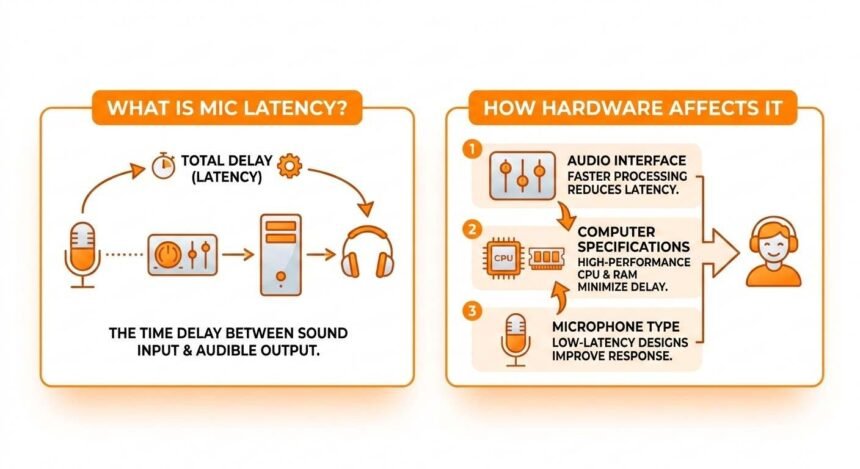
Mic latency is the small delay between speaking into a microphone and the sound being processed and played back through speakers or headphones. This delay is measured in milliseconds (ms).
Even a latency of 20–50ms can be noticeable during:
- Live streaming or podcasting – Your voice may sound out of sync with the video.
- Gaming – Delays make it harder to coordinate with teammates or respond to in-game events.
- Music recording – High latency can throw off timing when recording instruments or vocals.
The lower the latency, the more “instant” your voice feels, which is essential for professional audio setups.
How Mic Latency Works
Latency occurs because your voice passes through multiple stages before you hear it:
- Microphone Capture – Your voice is captured as an analog signal.
- Analog-to-Digital Conversion (ADC) – The microphone or audio interface converts the analog signal into digital data that your computer can process.
- Computer Processing – Audio software applies effects, mixes, or compressions to your digital signal.
- Digital-to-Analog Conversion (DAC) – The processed digital signal is converted back into an analog signal for your headphones or speakers.
- Playback – Finally, the sound is output, and you hear it.
Each step adds milliseconds of delay. While small individually, they can add up to a noticeable latency.
Common Causes of Mic Latency
Several factors contribute to mic latency, and understanding them helps you troubleshoot effectively.
1. Microphone Type
USB Microphones
- Easy to use, plug-and-play.
- Typically, they have higher latency because they rely on your computer’s CPU and internal sound card for processing.
XLR Microphones with Audio Interface
- Provide an external interface while offering much lower latency.
- Audio interfaces handle conversion and processing faster than most computers and often include direct monitoring, which lets you hear your voice without delay.
2. Audio Interface
An audio interface is a device that connects professional microphones to your computer. High-quality interfaces:
- Offer faster ADC and DAC processing.
- Reduce the burden on your computer.
- Enable direct monitoring to bypass software and achieve near-zero latency.
Examples of popular low-latency audio interfaces include the Focusrite Scarlett series and PreSonus AudioBox.
3. Computer Performance
Your CPU, RAM, and sound drivers play a huge role in mic latency:
- CPU Usage – Heavy multitasking or low-end processors can increase delay.
- RAM – Not enough memory can slow audio processing.
- Drivers – Outdated or poorly optimized drivers can introduce latency.
Tip: Close background applications, update drivers, and ensure your computer meets the recommended specifications for your recording software.
4. Buffer Size and Sample Rate
Buffer size and sample rate in your audio software determine how quickly your computer processes audio:
- Smaller Buffer Size – Reduces latency but increases CPU load. May cause glitches if the system cannot keep up.
- Larger Buffer Size – Reduces CPU load but increases latency. Useful for mixing or mastering, less ideal for real-time monitoring.
- Higher Sample Rate – Offers better audio quality but can slightly increase latency.
Balancing buffer size and sample rate is key to achieving minimal latency without compromising stability.
5. Monitoring Method
How you monitor your audio also affects perceived latency:
- Headphones – Direct monitoring via headphones reduces latency and prevents echo.
- Speakers – Sound from speakers can be picked up by your mic, creating feedback and making latency more noticeable.
For live streaming, gaming, or recording, wired headphones are recommended over Bluetooth, which adds extra delay.
How to Measure Mic Latency
Measuring your mic latency helps you understand your setup’s limitations and fix issues:
- Online Mic Testers – Simple tools that show mic waveform and response in real-time.
- Digital Audio Workstations (DAWs) – Programs like Audacity, FL Studio, or Ableton Live let you record and measure exact delay in milliseconds.
- Latency Plugins – Some plugins calculate system latency and provide compensation, ensuring audio lines up perfectly during recording or streaming.
Hardware Choices That Reduce Latency
Choosing the right hardware can drastically reduce mic latency:
| Hardware | Latency Impact | Notes |
|---|---|---|
| USB Microphone | Moderate | Good for casual use, higher latency than XLR |
| XLR Microphone | Low | Requires an audio interface, professional quality |
| Audio Interface | Very Low | High-end interfaces with direct monitoring minimize latency |
| Wired Headphones | Minimal | Prevents delay from air travel or Bluetooth |
| Computer Specs | Varies | Strong CPU and RAM reduce processing delay |
Tips to Reduce Mic Latency
Practical ways to reduce mic latency include:
- Use an XLR mic with a high-quality audio interface – reduces processing time and increases clarity.
- Enable direct monitoring – Hear yourself instantly without software processing.
- Adjust buffer size – Find the balance between CPU load and latency.
- Close background apps – Free up resources for audio processing.
- Use wired headphones – Avoid Bluetooth delays.
- Update drivers and firmware – Keep software optimized for audio performance.
- Choose low-latency audio software – Some DAWs are optimized for minimal delay.
By applying these steps, latency can often be reduced to under 10ms, which is nearly imperceptible.
Real-Life Examples
- Gaming: High latency can delay communication with teammates, leading to missed cues. A proper audio interface with direct monitoring solves this.
- Podcasting: Latency can disrupt the flow of conversation. Using headphones and a low-latency interface prevents echoes.
- Music Recording: Musicians need to hear themselves in real-time. Latency above 15ms can make playing instruments difficult.
Final Thoughts
Mic latency is a common but solvable issue. It arises from the time it takes for your voice to pass through hardware and software before reaching your ears. While USB mics and slower computers may introduce noticeable delay, investing in an XLR mic, audio interface, and optimizing your system can reduce latency to near-zero.
Understanding mic latency, measuring it, and choosing the right hardware ensures smooth, real-time audio for streaming, recording, or gaming. With the right setup, you can speak, perform, and interact instantly without frustrating delays.