By using this site, you agree to the Privacy Policy and Terms of Use.
Accept
100% Free & Private — Your audio never leaves your browser  ·  Test Your Mic Now →
Mic Test logo MicTestPro
Microphone Tests
Mic Test Popular
Test mic live — waveform, volume meter & pass/fail result instantly
Online Microphone Test
Full browser-based mic test — no downloads, no sign-up required
Webcam & Mic Test New
Test your camera and microphone together in one session
Mic Test for Zoom
Optimise audio for Zoom calls — test before every meeting
Mic Test for Google Meet
Check audio settings before Google Meet video calls
Mic Test for MS Teams
Verify your microphone works perfectly in Microsoft Teams
Keyboard Test
Test every key on your keyboard online — free, instant, no registration
Mouse Test
Check all mouse buttons, scroll wheel and DPI accuracy online
Touch Screen Test New
Multi-touch, gestures, swipe, pinch & latency — free online test
Spacebar Clicker
Click speed test — measure spacebar CPS and reactions free
Mobile Test
Full device check — sensors, screen, camera & audio on mobile
All tests — 100% free, no registration, works in browser
Start Quick Test
Specialised Audio Tests
Headphone Test
Test audio output, stereo imaging and frequency response
Speaker Test
Check speaker balance, stereo channels and volume output
Sound Test
Complete audio system test — input and output together
Echo Test New
Detect microphone echo and feedback loop issues
Background Noise Test
Measure ambient noise level and suppression effectiveness
Audio Latency Test
Measure your microphone input delay in milliseconds
Bluetooth Mic Test
Test wireless headset and Bluetooth microphone quality
USB Mic Test
Optimised test for USB condenser and dynamic microphones
Gaming Headset Test
Test gaming headsets — Discord, Steam, Xbox, PlayStation
Vocal Range Test New
Discover your vocal range — soprano, tenor, bass & more, free online
MIDI Test New
Test MIDI keyboard, controller and device input online free
Testing all audio devices — free, instant, browser-based
View All Tests
Gamepad & Controller Tests
Gamepad Tester Popular
Test all buttons, axes and triggers in real time — PS5, Xbox, Switch & more
Button Test New
Check every individual button — detect stuck or unresponsive inputs instantly
Deadzone Test
Visualise analog stick deadzone size and calibrate for competitive gaming
Stick Drift Test
Detect analog stick drift on PS5, Xbox, Switch and third-party controllers
Spacebar Clicker Hot
Measure CPS, reaction time and spacebar speed — free online
All game tests — free & online, no registration, works in any browser
Test My Gamepad
Free Online Tools
Audio Recorder
Record, play back and download audio clips — no software needed
Mic Comparison Tool New
Record & compare two microphones side by side
Frequency Analyser
Real-time FFT spectrum — 20Hz to 20kHz live visualisation
Volume Level Meter
Real-time dB volume meter with peak detection
Noise Suppression Test
Toggle NS/AEC/AGC and hear the difference live
Audio Quality Checker
Comprehensive audio quality diagnostic and scoring
Internet Speed Test New
Check download, upload and ping speed — free online, no registration
Web Page Test New
Analyse page performance, load time and resource breakdown
Mirror Test New
Use your camera as a mirror — flip, zoom & brightness free online
Vibration Test New
Test device vibration motor — pattern, intensity & duration free
All tools run locally in your browser — zero uploads, total privacy
All Tools
All Guides
Complete mic testing guide library
How to Test a Mic
Step-by-step walkthrough
Fix Mic Not Working
Windows, Mac, iOS, Android
Best Mics for WFH
2025 buyer's guide
Test Before a Zoom Call
60-second pre-call checklist
Improve Sound Quality
Pro tips for better audio
By Device Type
Built-in Laptop Mic Test
MacBook, Windows laptop, Chromebook internal microphones
USB Microphone Test
Blue Yeti, HyperX, Elgato Wave, AT2100x and more
Bluetooth Mic Test
AirPods, Sony WH, Jabra, Bose wireless headsets
XLR / Pro Mic Test
Test via Focusrite Scarlett, SSL, Universal Audio interfaces
Gaming Headset Mic Test
SteelSeries, Razer, Corsair, Logitech gaming headsets
iPhone / Android Mic Test
Test mobile built-in mics directly in Safari or Chrome
Blog
Test My Mic
Quick Links
Mic Test Headphone Test Speaker Test Echo Test 🎮 Gamepad Test Button Test Deadzone Test Stick Drift Test Guides Bluetooth Mic Frequency Analyser Audio Recorder Contact
Mic Test Pro
Microphone Tests
Mic Test Popular
Live waveform, level meter, pass/fail result
›
Online Microphone Test
No downloads, no sign-up required
›
Webcam & Mic Test
Camera and microphone combined test
›
Platform Tests
Mic Test for Zoom
Optimise for Zoom calls
›
Mic Test for Google Meet
Before Google video calls
›
Mic Test for MS Teams
Microsoft Teams audio check
›
Device & Screen Tests
Touch Screen Test New
Multi-touch, gestures, swipe & latency
›
Mobile Test
Sensors, screen, camera & audio on phone
›
Keyboard Test
Test every key online — free, instant
›
Mouse Test
Check all buttons and scroll wheel
›
Other Audio Tests
Headphone Test
Stereo, frequency and output test
›
Speaker Test
Check speaker balance and output
›
Echo Test
Detect echo and feedback issues
›
Bluetooth Mic Test
AirPods, wireless headsets
›
Gaming Headset Test
Discord, Xbox, PlayStation
›
Vocal Range Test New
Find your soprano, tenor, bass range free
›
MIDI Test New
Test MIDI keyboard and controller input
›
Game Tools
Gamepad Tester Popular
Test all buttons, axes and triggers in real time
›
Button Test New
Detect stuck or unresponsive inputs
›
Deadzone Test
Visualise stick deadzone and calibrate
›
Stick Drift Test
Detect drift on PS5, Xbox, Switch controllers
›
Spacebar Clicker Hot
CPS, reaction time and spacebar speed
›
Online Tools
Internet Speed Test New
Download, upload and ping speed free
›
Web Page Test New
Page performance and load time analysis
›
Mirror Test New
Use camera as mirror — flip, zoom & brightness
›
Vibration Test New
Test device vibration motor free online
›
Volume Meter
Real-time dB level meter with peak hold
›
Tools & Guides
Audio Recorder
Record and download audio clips
›
All Guides
Step-by-step mic testing guides
›
Blog
Audio news, reviews, tips
›
Company
About
Who we are and our mission
›
Contact Us
info@mictestpro.com
›
Start Free Mic Test Now
About Contact Guides
info@mictestpro.com mictestpro.com
Mic TestMic Test
Aa
  • Contact Us
Search
  • Mic Test
  • Blog
  • Contact Us
  • Live Support
  • Troubleshooting
Have an existing account? Sign In
Follow US
Guides & Tutorials

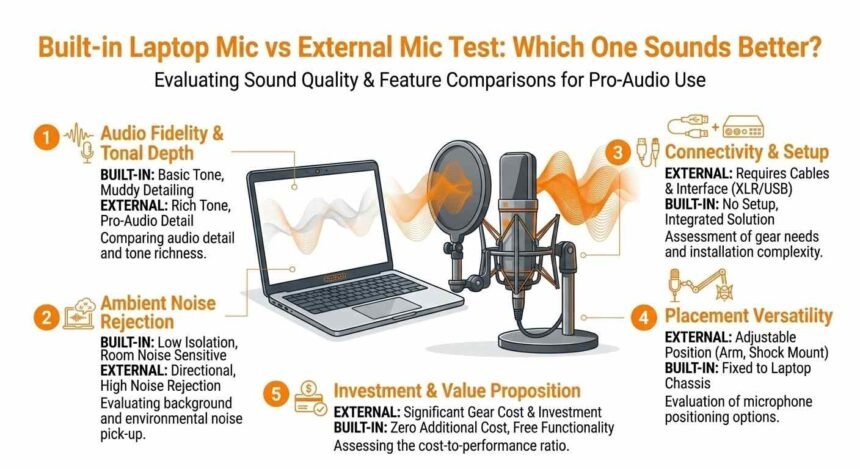
Built-in Laptop Mic vs External Mic Test: Which One Sounds Better?

Haleigh Doetschman Senior Software Engineer | UI/UX Developer
Last updated: 2026/03/17 at 12:59 AM
Haleigh Doetschman Senior Software Engineer | UI/UX Developer 8 Min Read
Share
Built-in Laptop Mic vs External Mic Test: Which One Sounds Better?

If you’ve ever wondered why your voice sounds thin, muffled, or unclear on calls, streams, or recordings, the difference often comes down to how you test your mic. Whether for casual calls, podcasts, or content creation, knowing how to test your mic and properly optimize its setup is essential for clear, professional sound.

Contents
How a Mic Captures SoundBuilt-in Laptop Mic TestHow to TestPros of Built-in MicsCons of Built-in MicsExternal Mic TestHow to TestPros of External MicsCons of External MicsSide-by-Side Sound TestBest Use Cases for Each MicWhat Affects Your Mic Test Results1. Distance From Your Mouth2. Room Acoustics3. Gain and Volume Settings4. Background Noise5. Polar PatternAdvanced Tips to Improve Any Mic TestFor Built-in MicsFor External MicsSoftware Tools to Enhance SoundTesting Tricks You Can UseBuying Guide: Choosing the Right External MicStart With Your BudgetConsider Your Use CaseTest Before You BuyFinal Verdict

How a Mic Captures Sound

Understanding how your mic works will help you test it effectively:

  • Your voice produces sound waves in the air.
  • The mic converts these waves into an electrical signal.
  • That signal is then amplified, processed, or recorded.
  • The closer the mic is to your mouth, the cleaner and stronger the signal will be.
  • Larger mic capsules capture more detail, while small laptop mics capture less depth.

Think of it like a camera: bigger lenses capture more detail; bigger capsules capture more natural sound.

Built-in Laptop Mic Test

Most laptops come with a tiny mic hidden near the webcam or keyboard. Testing it shows you its limits and helps improve clarity in calls.

How to Test

  1. Sit 20–30 cm from your screen.
  2. Use an online mic test tool like Online Mic Test or a free recording app.
  3. Speak at your normal voice level.
  4. Listen carefully to the playback for clarity, background noise, and echo.

Pros of Built-in Mics

  • Always available, no setup required
  • Free to use
  • Works with any app automatically
  • Battery-free

Cons of Built-in Mics

  • Picks up keyboard and fan noise
  • Can sound thin or hollow
  • Far from your mouth, reducing clarity
  • Sensitive to room echo and reverb
  • Not suitable for professional recordings

Pro tip: If you type while speaking, your built-in mic will almost certainly pick up keystrokes. Testing will make this obvious so that you can adjust your setup.

External Mic Test

External mics connect via USB, 3.5mm jack, or professional audio interface. Proper testing ensures you get the best sound for calls, recordings, or streams.

How to Test

  1. Position the mic 10–20 cm from your mouth.
  2. Use a pop filter or foam cover to reduce harsh P and B sounds.
  3. Record in a quiet room with minimal background noise.
  4. Compare test recordings for clarity, depth, and noise rejection.

Pros of External Mics

  • Clear, full, and natural voice
  • Captures more detail and warmth
  • Reduces background noise and echo
  • Flexible positioning and angles
  • Works well for streaming, recording, and professional calls

Cons of External Mics

  • Costs extra money
  • Requires setup and desk space
  • XLR types need additional equipment, like an audio interface

Pro tip: Test different distances and angles to find the optimal position for your voice. Small adjustments can dramatically improve clarity.

Side-by-Side Sound Test

To compare both types, test these factors in the same environment:

FactorBuilt-in Laptop MicExternal MicWinner
Voice ClarityThin, muffledClear, richExternal
Background NoiseHighLowExternal
Keyboard NoiseLoudMinimalExternal
Fan NoiseOften audibleRarelyExternal
Bass & WarmthWeakStrongExternal
Frequency RangeNarrowWideExternal
ConvenienceAlways readyNeeds setupBuilt-in
CostFreeExtraBuilt-in
PortabilityAlways with youExtra itemBuilt-in
Room EchoCaptures reflectionsLess echoExternal

Testing tip: Record the same sentence with both mics and listen through headphones to notice subtle differences.

Best Use Cases for Each Mic

SituationRecommended Mic
Quick video callsBuilt-in
Zoom/Teams callsBuilt-in or external
Streaming or gamingExternal preferred
YouTube contentExternal
PodcastsExternal
Music or voiceover recordingExternal
On-the-go callsBuilt-in

What Affects Your Mic Test Results

Even the best external mic can sound bad if other factors are ignored.

1. Distance From Your Mouth

Closer = stronger, clearer signal. 10–20 cm is ideal for most external mics.

2. Room Acoustics

  • Hard walls = echo and reverb
  • Soft surfaces = absorb reflections
  • Carpets, curtains, bookshelves, and padded furniture reduce echo

3. Gain and Volume Settings

  • Too high = distorted, harsh sound
  • Too low = weak, noisy recording
  • Always test different gain settings to find the sweet spot

4. Background Noise

Fans, AC, traffic, and other people affect your test results. Reduce noise before testing.

5. Polar Pattern

  • Cardioid: picks up sound from the front, ideal for solo recording
  • Omnidirectional: picks up all around, less ideal for noisy rooms

Advanced Tips to Improve Any Mic Test

For Built-in Mics

  • Lean closer to the screen
  • Mute yourself when not speaking
  • Close windows and reduce fan noise
  • Use built-in noise suppression in Zoom, Teams, or Discord
  • Test your volume before important calls

For External Mics

  • Keep 10–20 cm from your mouth
  • Use a pop filter to reduce plosives
  • Mount on a stand or boom arm to prevent desk vibrations
  • Point slightly off-axis for cleaner recordings
  • Add soft furnishings or blankets to reduce echo

Software Tools to Enhance Sound

  • Krisp: AI noise removal for calls
  • NVIDIA RTX Voice: Real-time noise suppression
  • Audacity: Free audio editor for noise reduction, EQ, and compression
  • Adobe Podcast AI: Enhances recordings automatically

Pro tip: Hanging a thick blanket behind your setup can dramatically reduce reflections and instantly improve test results.

Testing Tricks You Can Use

  • Clap or snap your fingers to detect room echo
  • Record the same phrase multiple times at different distances
  • Test with different gains and input levels
  • Compare results using headphones rather than speakers
  • Use online mic test tools to check frequency response and volume

Buying Guide: Choosing the Right External Mic

Start With Your Budget

  • Under $50: USB clip-on or small condenser
  • $50–$100: Entry-level USB for streaming or content creation
  • $100–$200: Popular with podcasters, streamers, and video creators
  • $200+: Professional XLR mics with audio interface for studio use

Consider Your Use Case

  • Calls & casual use → small USB or headset mic
  • Podcasting → large-diaphragm condenser
  • Streaming → cardioid USB mic with noise rejection
  • Music → XLR condenser with audio interface
  • Travel → compact USB-C or lavalier mic

Test Before You Buy

  • Listen to sample recordings on YouTube
  • Check real user reviews with audio samples
  • Consider connection type: USB is plug-and-play, XLR is more flexible

Final Verdict

Testing your mic before any call, stream, or recording ensures you always sound clear and professional. External mics generally outperform built-in mics, but proper testing and setup make the biggest difference.

Even a $30 USB mic, tested and positioned correctly, can sound much better than a built-in laptop mic. Combine good placement, a quiet environment, and optional software tools to maximize your sound.

Start today: Run a quick test, make small adjustments, and notice the difference immediately.
Share This Article
Facebook Twitter Email Copy Link Print
By Haleigh Doetschman Senior Software Engineer | UI/UX Developer
Follow:
Haleigh Doetschman is a Senior Software Engineer and UI/UX Developer at Mic Test specializing in React, JavaScript, TypeScript, and CSS to build fast and intuitive microphone testing tools.
Previous Article How to Improve Mic Sound Quality for Calls and Recording How to Improve Mic Sound Quality for Calls and Recording
Next Article How to Test Your Mic Before Zoom or Online Meetings How to Test Your Mic Before Zoom or Online Meetings
Leave a comment Leave a comment

Leave a Reply Cancel reply

Your email address will not be published. Required fields are marked *

Most Popular

A Memoir of Soccer, Grit, and Leveling the Playing Field
10 Super Easy Steps to Your Dream Body 4X
Mind Gym : An Athlete's Guide to Inner Excellence
Mastering The Terrain Racing, Courses and Training
How to Fix a Microphone Not Working on Windows 10 and Windows 11

How to Fix a Microphone Not Working on Windows 10 and Windows 11

By Samantha Rembolt Audio Systems Specialist | Mic Test Team
Free Online Test Tools
LIVE
🎵 Audio
🎤
Mic Test HOT
🔊
Speaker Test POP
🎧
Headphone Test
🎵
Frequency Test
⏱️
Audio Latency NEW
⌨️ Input Devices
⌨️
Keyboard Test HOT
🖱️
Mouse Test
👆
Touch Screen NEW
🖥️ Visual & Display
📷
Camera Test POP
🖥️
Screen Test
🎨
Color Test
📊 Performance
📶
Internet Speed HOT
🔋
Battery Test
🖱️
Click Speed POP
No Registration · Free
15 Tools

How to Test Your Mic Online in 30 Seconds

3 weeks ago

Mic Not Working? 10 Easy Fixes That Work Instantly

3 weeks ago

You Might Also Like

How to Test Your Mic Before Zoom or Online Meetings
Guides & Tutorials

How to Test Your Mic Before Zoom or Online Meetings

1 week ago
How to Improve Mic Sound Quality for Calls and Recording
Guides & Tutorials

How to Improve Mic Sound Quality for Calls and Recording

1 week ago
How to Test Your Mic Online in 30 Seconds
Guides & Tutorials

How to Test Your Mic Online in 30 Seconds

1 week ago
How to Test Your Microphone Online Step by Step Guide
Guides & Tutorials

How to Test Your Microphone Online Step by Step Guide

1 week ago

Ready to Test Your Microphone?

Free, instant, 100% private — works on every device. No downloads, no sign-up.

Start Free Mic Test
Mic Test Pro All In One Free

The free, browser-based microphone testing suite trusted by millions. Test, diagnose, and optimise your audio in seconds — complete privacy, zero downloads.

Free Forever All Devices No Registration
Follow Us
Contact Us
Email
info@mictestpro.com
Phone
+1 (661) 396-2801
Office Address
2701 Ming Ave, Bakersfield,
CA 93304, United States
Support Hours
Mon – Fri, 9 AM – 6 PM PST
Response within 24 hrs
Live Support
mictestpro.com/live-support
Contact Page
mictestpro.com/contact-us
Newsletter

Get audio tips, mic reviews, and new feature updates delivered to your inbox. No spam — unsubscribe any time.

No spam · Unsubscribe anytime · Free
Google News Source Write a Google Review
Mic Tests
Mic Test Online Mic Test Webcam & Mic Test Mic Test for Zoom Mic Test for Meet Mic Test for Teams Mic Test for Discord Mic Test for Skype Mic Test for OBS iPhone Mic Test Android Mic Test AirPods Mic Test
Audio Tests
Headphone Test Speaker Test Sound Test Echo Test Background Noise Test Audio Latency Test Bluetooth Mic Test USB Mic Test Gaming Headset Test Vocal Range Test MIDI Test Volume Meter Frequency Analyser Noise Suppression
Device Tests
Condenser Mic Test XLR Microphone Test Mic Comparison Tool Keyboard Test Mouse Test Touch Screen Test Mobile Test Dead Pixel Test Vibration Test Internet Speed Test Web Page Test
Lavalier Mic Test Soon
Ribbon Mic Test Soon
Game Tools
Gamepad Tester Controller Test Button Test Deadzone Test Stick Drift Test Spacebar Clicker
FPS Counter Soon
Ping Test Soon
Tools
Audio Recorder Audio Latency Tester Mirror Test Troubleshooting Guide All Guides Guides & Tutorials Troubleshooting Tips Tech & Hardware
Waveform Visualiser Soon
Decibel Meter App Soon
Company
About Us Contact Us Live Support Privacy Policy Terms of Service DMCA Policy Disclaimer Sitemap
Meet the Team
MT
Mic Team Experts
Core Testing Team
YF
Yuki Fujieda
Technology Expert
SR
Samantha Rembolt
Audio Systems Specialist
HD
Haleigh Doetschman
Senior Developer
AS
Alexandra Saucedo
Audio Technology Specialist
IL
Isaiah Lindsey
Game Developer & Tester
Mic Test Pro — Team Management Office
2701 Ming Ave, Bakersfield, CA 93304, United States  ·  info@mictestpro.com  ·  +1 (661) 396-2801
View on Map Contact Us
© MicTestPro.com — All rights reserved.
Your microphone audio is processed locally and never sent to our servers.
Privacy Policy Terms of Service DMCA Policy Disclaimer Contact Sitemap
Made with ♥ for better audio
Welcome Back!

Sign in to your account

Lost your password?